 CampusDraft
Bleed
Background artwork extends beyond the trim line. A 3 mm bleed per edge adds 6 mm to each physical dimension; it is an example, not a universal requirement.
Distinguish whole-card dimensions from portrait requirements, then convert landscape and portrait pixels by PPI, bleed per edge, and safe margin. Calculations run locally in your browser.
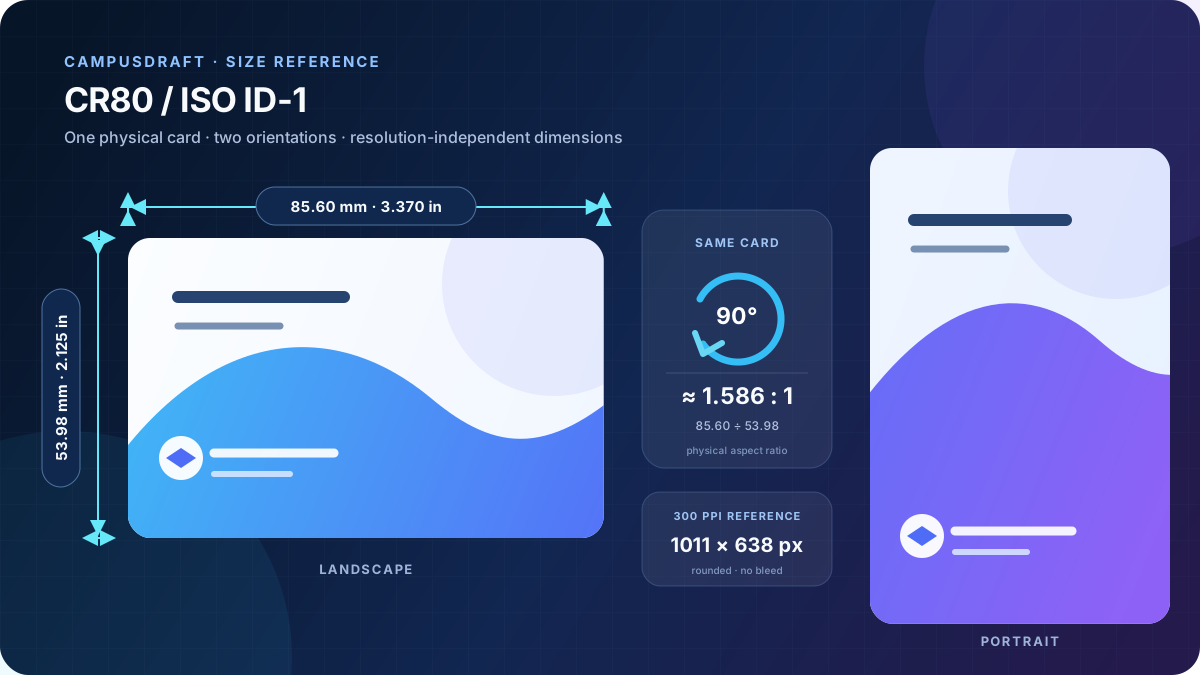
If you mean the whole student ID card—not an institution's portrait-upload requirement—the common wallet format is CR80 / ISO ID-1: 85.60 × 53.98 mm, 8.560 × 5.398 cm, or about 3.370 × 2.125 in. Portrait orientation rotates the same physical card by 90°.
A finished CR80 card is 85.60 × 53.98 mm. At 300 PPI, a no-bleed canvas is about 1011 × 638 px; adding an example 3 mm bleed to every edge makes the canvas 91.60 × 59.98 mm, or about 1082 × 708 px. Use the actual print provider's template for bleed and safe-area requirements.
85.60 × 53.98 mm
85.60 × 53.98 mm
79.60 × 47.98 mm
300 PPI examples—not universal print standards: 2 mm bleed per edge is about 1058 × 685 px; 3 mm is about 1082 × 708 px; and 1/8 in (3.175 mm) is about 1086 × 713 px.
Bleed is added to every edge, so 3 mm per edge adds 6 mm to each physical dimension. A safe margin is measured inward from the finished edge; the default 3 mm is only an editable example. Results use the exact metric size and round once to whole pixels. Follow the actual print provider's template for production.
Enter valid values: whole-number PPI from 72 to 1200; bleed from 0–10 mm with up to three decimals; safe margin from 0–10 mm in 0.1 mm steps.
Orientation does not change the physical format; pixel values change only with resolution, bleed, and safe margin.
The no-bleed formula is pixels = millimetres ÷ 25.4 × PPI. These values use the exact 85.60 × 53.98 mm size and round each final dimension once. PPI describes image pixels per inch; DPI usually describes a printer's dot resolution.
| Resolution | Landscape pixels | Portrait pixels | Context |
|---|---|---|---|
| 96 PPI | about 324 × 204 px | about 204 × 324 px | Web-layout conversion reference |
| 150 PPI | about 506 × 319 px | about 319 × 506 px | Medium-resolution proof |
| 300 PPI | about 1011 × 638 px | about 638 × 1011 px | High-resolution artwork reference |
| 600 PPI | about 2022 × 1275 px | about 1275 × 2022 px | High-resolution workflow reference |
Background artwork extends beyond the trim line. A 3 mm bleed per edge adds 6 mm to each physical dimension; it is an example, not a universal requirement.
The finished CR80 card remains 85.60 × 53.98 mm and does not include bleed.
Important text and photos sit inward from the trim edge. The default 3 mm is only a rectangular example and does not model rounded corners, chips, stripes, or printer no-go zones.
| Bleed per edge | Physical canvas | Landscape pixels |
|---|---|---|
| 0 mm | 85.60 × 53.98 mm | 1011 × 638 px |
| 2 mm | 89.60 × 57.98 mm | 1058 × 685 px |
| 3 mm | 91.60 × 59.98 mm | 1082 × 708 px |
| 1/8 in (3.175 mm) | 91.95 × 60.33 mm | 1086 × 713 px |
There is no universal student ID portrait pixel size. Each school or issuer may specify a different aspect ratio, minimum pixels, background, file format, and file-size limit. CR80 values describe the whole card and cannot replace an institution's photo-upload instructions; CampusDraft does not validate or prepare official school photos.
Templates 3 and 4 use screen proportions close to CR80, but their results remain browser previews rather than fixed-size production files. Scene cards, badges, and full-page letters use other proportions.


Wait for images, fonts, and backgrounds, then check orientation, cropping, and fields.
Confirm paper, orientation, margins, background graphics, and page count.
100% or Actual size is meaningful only when the source defines a controlled physical page box.
For precise production, use the printer or provider template and measure one proof.
The finished size is 85.60 × 53.98 mm. Landscape and portrait use the same size with orientation exchanged.
Using the exact metric size with no bleed, it is about 1011 × 638 px in landscape or 638 × 1011 px in portrait.
No. That number describes the whole card canvas. Follow the issuing institution's portrait-upload requirements.
There is no universal value. Enter the actual provider requirement; do not treat the 2 or 3 mm examples as a global standard.
No. It generates an HTML browser preview that can be printed or saved as PDF, without a guaranteed physical page box.
Calculation and factual basis: ISO/IEC 7810:2019 · Entrust CR80 media specifications · Chrome print and Save as PDF. Last checked .
Compare all 13 card and campus document layouts, then return to the generator for a browser preview.